

Release 4.6.0 - Early christmas present
 With this
release we have rewritten the complete GUI. We added some new hardware and some
other hardware has been tested, fixed and confirmed to be working. Also the
Docker build has been reduced to only 10 minutes and the size has been reduced
by 33%. And we made some code updates to improve stability.
With this
release we have rewritten the complete GUI. We added some new hardware and some
other hardware has been tested, fixed and confirmed to be working. Also the
Docker build has been reduced to only 10 minutes and the size has been reduced
by 33%. And we made some code updates to improve stability.
Here are some highlights of this release.
New GUI build with Svelte
 The GUI is
completely rewritten using Svelte reactive javascript framework. This is a new
reactive framework which works very easy and very fast. In the old GUI we used a
lot of jQuery which is not always the best way to do it. Also with Svelte there
is a better memory management and better timer control on reloading data. The
GUI itself looks almost the same, but some forms will be smaller and only
showing fields that are needed based on choices. With this new GUI we hope that
the interface feels a bit more like an app and less sluggish.
The GUI is
completely rewritten using Svelte reactive javascript framework. This is a new
reactive framework which works very easy and very fast. In the old GUI we used a
lot of jQuery which is not always the best way to do it. Also with Svelte there
is a better memory management and better timer control on reloading data. The
GUI itself looks almost the same, but some forms will be smaller and only
showing fields that are needed based on choices. With this new GUI we hope that
the interface feels a bit more like an app and less sluggish.
Translation changes
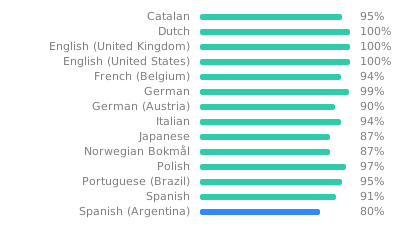 With the new GUI, we had to change the translations. Now
there are two parts. There is a backend part, which is used by the daemon that
is doing all the updates and running the code on the Raspberry PI. The GUI part,
is like the name says, the GUI or front-end. This has been separated because
there are two different ways of translating. And therefore, we need to have two
translation parts.
With the new GUI, we had to change the translations. Now
there are two parts. There is a backend part, which is used by the daemon that
is doing all the updates and running the code on the Raspberry PI. The GUI part,
is like the name says, the GUI or front-end. This has been separated because
there are two different ways of translating. And therefore, we need to have two
translation parts.
We have tried to merge the old translations into the new parts. But some translations could be lost. And all missing translations are now translated with Google translate. And therefore, also some translations could be wrong. Please feel free to update it here.
New and fixed hardware
We do now support remote buttons through remote JSON data. In order not to overwhelm the remote server, you can specify how often it will update the button state. This will make the option to add remote doors in TerrariumPI.
The Atlas Scientific sensors are now tested and working. So all available sensors can be used.
Docker optimizations
 With the new
GUI we had to look at the Docker build setup. And it turned out we could improve
it a lot. The first Docker build was not very optimized. Now we have downgraded
the Python version to the same version as on the Raspberry PIs. That way we can
use the Piwheels python package builds and speed up the
build enormously. And looking into the installed packages we could remove some
which made the image also a lot
smaller.
With the new
GUI we had to look at the Docker build setup. And it turned out we could improve
it a lot. The first Docker build was not very optimized. Now we have downgraded
the Python version to the same version as on the Raspberry PIs. That way we can
use the Piwheels python package builds and speed up the
build enormously. And looking into the installed packages we could remove some
which made the image also a lot
smaller.
There is one change in the Docker-compose.yml file which should be updated with this release. You should remove the mount volume /opt/vc as this now build on the image it self. Look for an up to date example here.
Installing / Upgrading
| Get the new version: | Manual / Docker |
| And go the installation page in order to install Terrarium PI version. | Manual / Docker |
| Or, go the upgrade steps at the installation page. | Manual / Docker |
Translations
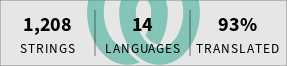 Not all translations are done.
Add missing translations here!
Not all translations are done.
Add missing translations here!
All help is appreciated.
Current translation status:
